Why I Stopped Using TradingView
I used TradingView for about three years before I finally gave up on it. Not because the platform is bad — it is genuinely well-built and the Pine Script community is impressive — but because the pricing math stopped making sense for what I actually needed.
My breaking point was the indicator cap. I run a fairly simple swing trading setup: a 20 EMA, a 50 EMA, RSI, and MACD. That is four indicators. On TradingView's free tier you get one. On the Essential plan at $14.95 a month you get two. To run my basic setup I needed the Plus plan at $29.95 a month. That is $360 a year to stack four indicators on a chart. It felt absurd.
What pushed me to seriously explore alternatives was the realization that the features I actually wanted — AI-driven signals, insider trading data, automated pattern recognition — did not exist on TradingView at any price. I was paying $30 a month for charts and then separately trying to piece together smart money data from SEC EDGAR, pattern scanners from other services, and AI analysis from ChatGPT by pasting in price data manually. The workflow was a mess.
So I went looking. In the process I tested basically every serious TradingView competitor on the market. Here is what I found.
What I Was Looking For
Before getting into the platforms, here is what I weighted most heavily:
- Free tier generosity — How much can you actually do without paying? One indicator is not a free tier, it is a demo.
- AI features — In 2026 a charting platform without AI is behind the curve. I wanted signals, an assistant, and ideally a backtester.
- Fundamental data built in — Switching apps to check earnings, P/E, or analyst ratings breaks the analysis flow. I wanted it inside the charting interface.
- Real-time data — Delayed quotes on a free tier is a dealbreaker for active trading.
- Upgrade pricing — If I ever pay, I want it to be reasonable. $60/month for charting software is not reasonable.
Quick Comparison
| Platform | Free Tier | Indicators (Free) | AI Features | Real-Time Data | Fundamentals | Premium From |
|---|---|---|---|---|---|---|
| ChartingLens | Yes | 15+ | Signals + AI + Backtester | Yes | Full panel | $9.99/mo |
| TrendSpider | Trial only | 100+ | Pattern scanner | Yes | Basic | $33/mo |
| thinkorswim | Yes (broker) | 400+ | No | Yes | Yes | Free |
| NinjaTrader | Yes | 100+ | No | Sim / paid live | No | From $59/mo |
| MetaTrader 5 | Yes (broker) | 80+ | No | Yes | No | Free |
The 5 Platforms I Tested
1. ChartingLens — My Top Pick
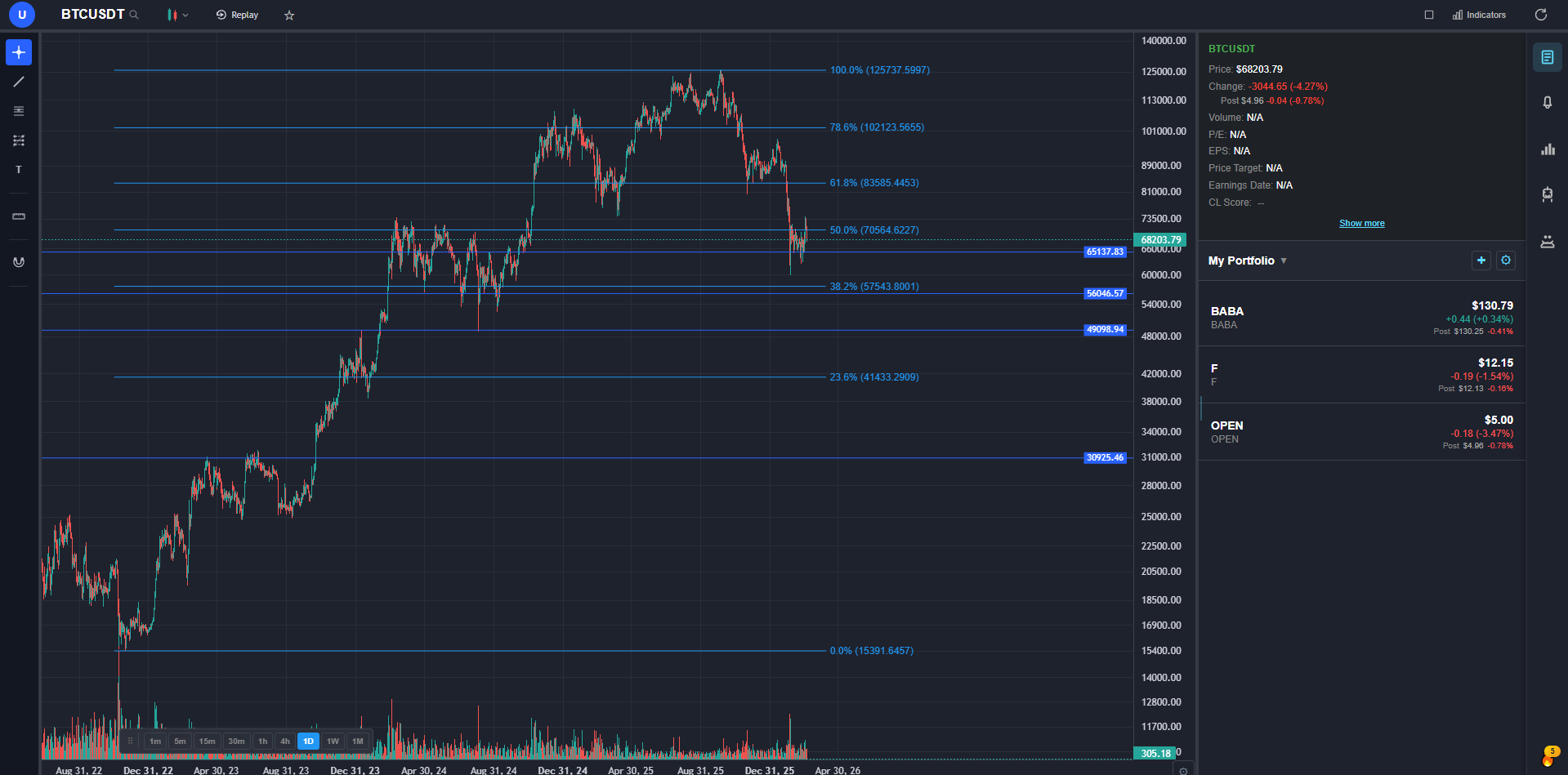
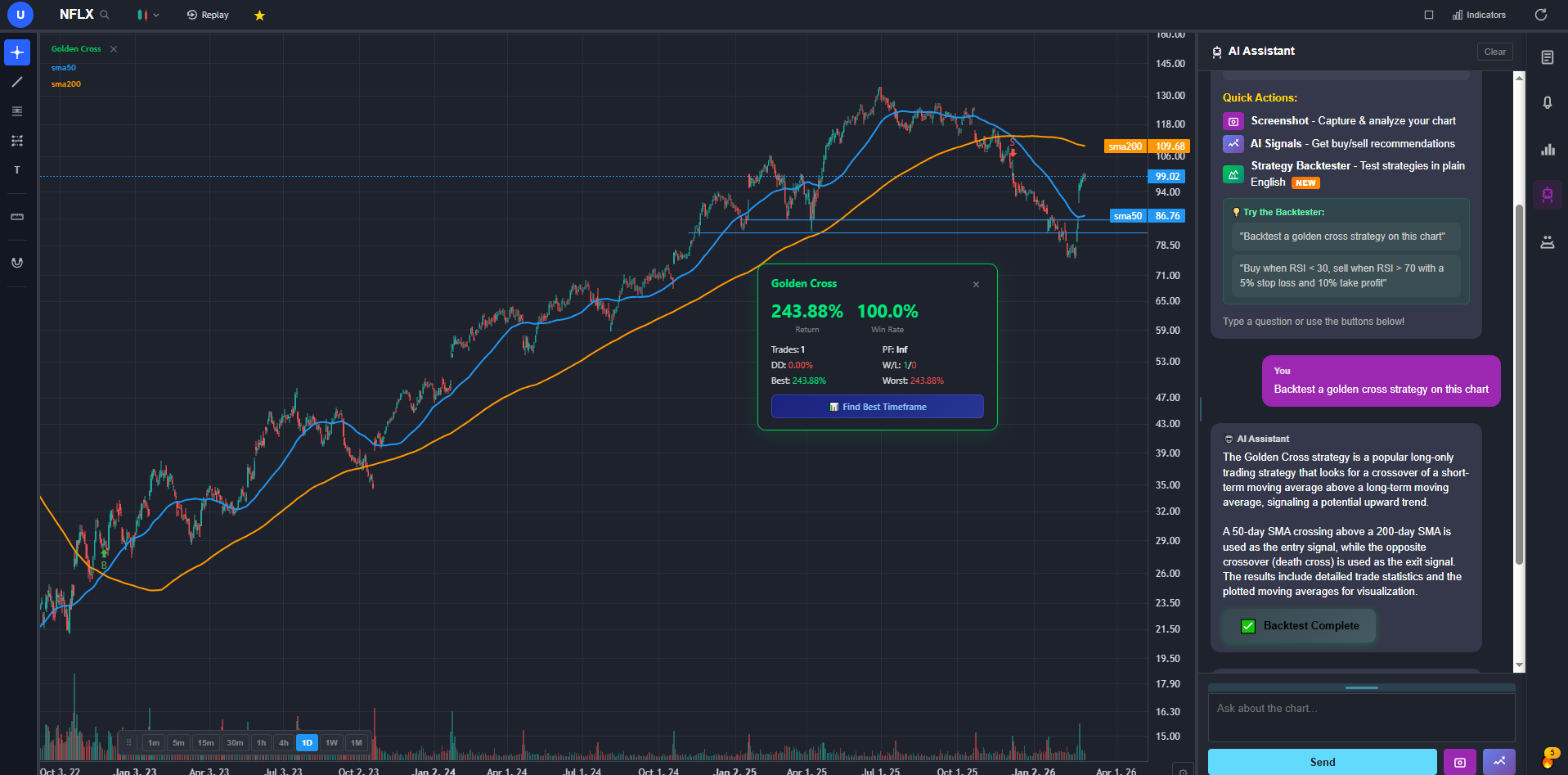
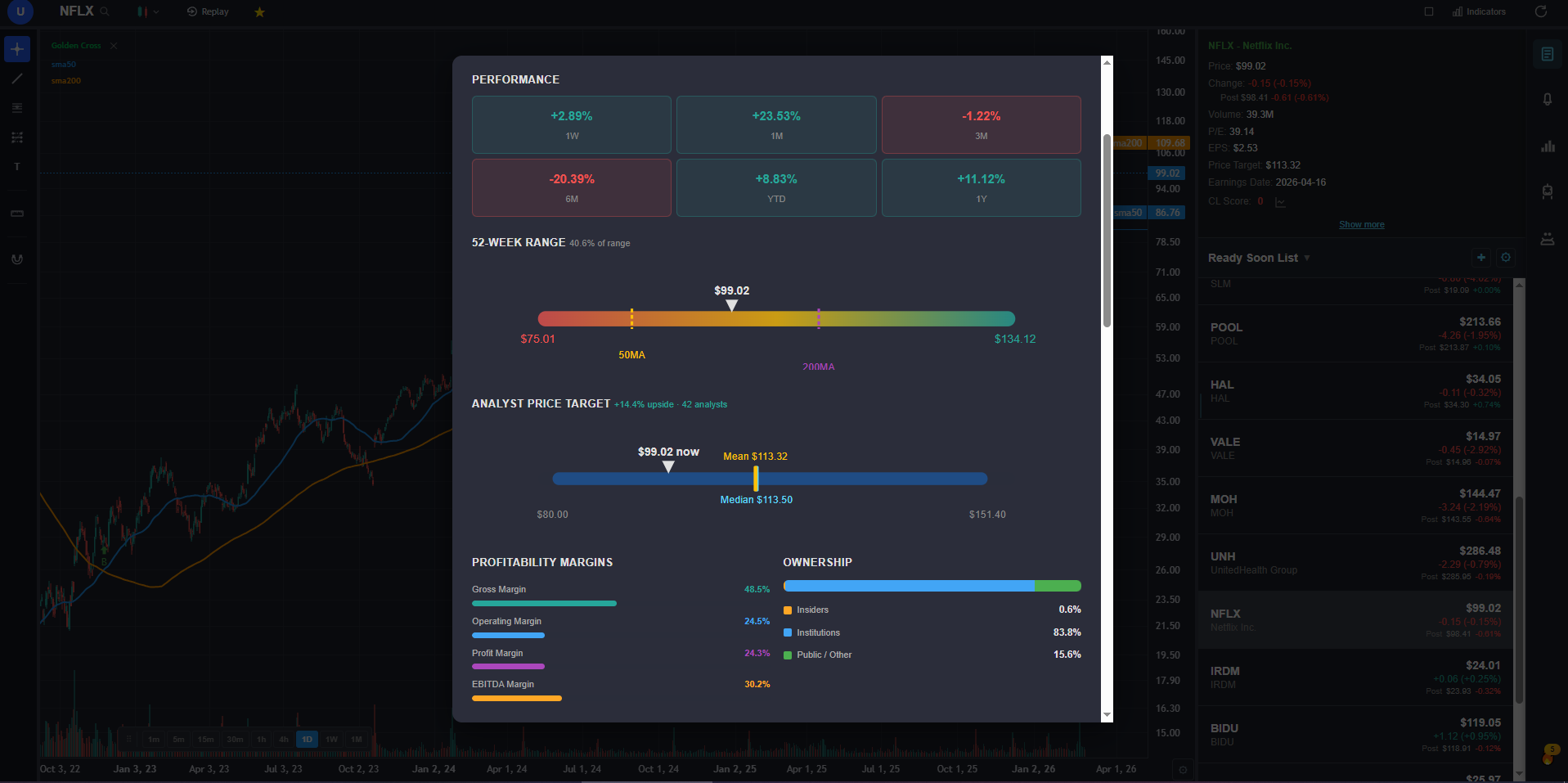
I use ChartingLens every single day for my own trading, and I can tell you exactly what it does well and where it still has gaps.
The free tier is genuinely usable in a way that most platforms are not. You get real-time charts for both stocks and crypto, over 15 technical indicators with no cap on how many you stack per chart, cloud-synced drawing tools, and zero ads. That is the baseline. But the features I am actually proud of go beyond that.
The AI trading assistant is context-aware — it knows what symbol you are looking at and can take actions on your chart. One of my favorite features: ask it for support and resistance levels on any stock, and it identifies the key zones and draws them directly on the chart as color-coded horizontal lines. No manual line drawing. It also generates AI buy/sell signals by scanning 2,000+ stocks daily, and includes an auto chart pattern recognizer that flags head-and-shoulders, double tops, wedges, and other formations on the chart automatically.
The feature I spent the most time building — and the one that gets the most user feedback — is the fundamentals panel. Clicking "Show More" on any stock opens a full modal with income statements, balance sheets, cash flow history, analyst price targets, buy/sell/hold recommendations, institutional ownership, insider holdings, and an options flow tab with activity broken down by expiration and strike. I got tired of tabbing between my charting platform and a separate fundamentals tool, so I built it in.
The AI strategy backtester lets you describe a strategy in plain English. No Pine Script, no coding. Type something like "buy when the 20 EMA crosses above the 50 EMA, sell when RSI hits 75, with a 4% stop loss" and the platform builds and runs it, plots every signal on the chart, shows an equity curve, and gives you the full stats: total return, Sharpe ratio, win rate, max drawdown. It also supports shorting strategies and time-based filters — useful if you only want to trade during specific market hours or on certain days of the week. The "Find Best Timeframe" button re-runs your strategy across 15m, 1h, 4h, and daily and ranks them by a composite score.
Where ChartingLens still falls short: it does not have Pine Script or a custom scripting language, it is focused on built-in AI tooling rather than a community script marketplace, and there is no direct broker integration for order execution. Those are real gaps. But for analysis — charting, AI signals, pattern recognition, fundamentals, insider data, backtesting — it is the most complete free platform I have found, and I have tested all of them.
2. TrendSpider — Best Overall All-Around Alternative
TrendSpider is the platform I would recommend to a TradingView user who specifically wants automation. Its signature feature is automated technical analysis — trendlines, Fibonacci levels, and chart patterns are detected and drawn for you across multiple timeframes simultaneously. The multi-timeframe analysis grid is genuinely useful: you can set up a scan that fires only when the 1H, 4H, and daily all agree on a setup, which is the kind of confluence work most retail traders do manually.
The AI scanner — what they call Market Scanner with Smart Checklist — lets you build conditions visually instead of in script form, then run them across thousands of tickers. Strategy backtesting is built in, alerts can be tied to dynamic levels rather than static prices, and the indicator library covers around 100 studies. For traders whose workflow is rules-based scanning, TrendSpider is built for them.
The catch is price. Plans start around $33/month on annual and climb past $100/month at higher tiers — more expensive than some competitors and meaningfully more than TradingView's Essential plan. There is also no conversational AI assistant, no insider trading data, and no superinvestor tracking.
3. thinkorswim — Best for US Stocks and Options
thinkorswim, now owned by Schwab, is one of the most powerful free desktop trading platforms ever shipped to retail. Open a Schwab brokerage account and you get the full desktop client at no cost — real-time data, hundreds of indicators, thinkScript for custom studies, paper trading with the same engine as live, and some of the deepest options analytics anywhere. The Analyze tab for modeling option positions across price and volatility scenarios is still the benchmark.
The charting itself is excellent once you tame it. Multi-monitor support, advanced order entry directly from the chart, custom scan engines, and a built-in earnings/economic calendar all come included. For US-focused traders who care about options and execution quality, thinkorswim is hard to argue with.
The downside is the interface — it can feel cluttered, especially on a single monitor, and the learning curve is real. It is also US-centric: you need a Schwab account, which is not viable for many international traders. And there are no AI features, no automated pattern recognition, and no plain-English backtesting.
4. NinjaTrader — Best for Futures and Day Trading
NinjaTrader is the platform that futures and active day traders keep coming back to. The order flow tooling — DOM, Order Flow +, Volume Profile, Market Replay — is best-in-class for tape readers, and the execution path is fast enough that scalpers can actually live on it. The chart trader interface lets you place, modify, and bracket orders directly off the price ladder, which once you get used to it is hard to give up.
Simulated trading and basic charting are free. Strategy development uses NinjaScript (C#), so if you can program, the backtesting and strategy automation are powerful. The third-party indicator and add-on ecosystem on the NinjaTrader Ecosystem store is large, particularly for order-flow-based studies.
The learning curve is the steepest on this list. The interface assumes you already understand DOM trading, the NinjaScript syntax is not friendly to non-developers, and live data plus the unlocked feature set runs around $59/month on a lease — or a four-figure lifetime license. It is also futures and FX first; equities work but is not the focus. There are no AI features.
5. MetaTrader 5 — Best for Forex and Algo Trading
MetaTrader 5 is the default platform of the retail forex world, and that ecosystem advantage is the main reason to use it. Nearly every retail FX broker supports MT5, the MQL5 marketplace has thousands of paid and free Expert Advisors and indicators, and there is a global community of algo developers who treat MQL5 as their primary language. If your strategy is automated and your market is forex or CFDs, MT5 has more battle-tested infrastructure than anything else here.
The platform itself is free — you connect it to a broker and the broker pays for the licensing on their end. It includes a strategy tester for backtesting and optimizing Expert Advisors, around 80 built-in indicators, and unlimited charts. The Strategy Tester supports multi-currency backtests and walk-forward analysis, which is rare at this price point.
The downside is that the interface still looks and behaves like a Windows desktop app from the early 2010s. Charting feels dated compared to anything browser-based, mobile is acceptable but not great, and US stock coverage depends entirely on which broker you connect to. There are no native AI features and no fundamentals panel. For traders whose primary instrument is forex and whose strategies live in code, MT5 is the right choice.
My Final Verdict
After testing every platform on this list extensively, my take is straightforward: the TradingView alternatives have genuinely caught up and in many cases surpassed it, especially for traders who do not rely on Pine Script or the social community.
If you are looking for the best free TradingView alternative with real depth — AI signals, strategy backtesting, company fundamentals, options flow, insider data, pattern recognition, and real-time charts all in one place — the #1 pick above is what I would recommend. No other platform I tested offered that combination at any price.
If your edge is rules-based automation, TrendSpider is the strongest add-on. If your market is US stocks and options and you already have a Schwab account, thinkorswim is the free desktop benchmark. If you live on the futures DOM, NinjaTrader is the execution tool. And if you trade forex with automated Expert Advisors, MetaTrader 5 is still the default. Most serious traders end up with two tools working together — one for analysis, one for execution — rather than relying on a single platform for everything.