How I Judged Them
I have a bad habit of collecting screeners. At one point last year I was paying for three, running roughly the same scan on each, and getting three slightly different lists that I then had to reconcile by hand. That is not analysis. That is admin.
So this ranking is built around the thing that actually decides whether a screener earns its subscription: how quickly a list of tickers turns into a decision. Five criteria, in the order they matter to me.
- Universe coverage. US equities are table stakes. Whether you get international markets, ETFs, and other asset classes decides how far the tool scales as your interests widen.
- Filter depth versus usability. Every screener claims hundreds of filters. The question is whether you can express the specific idea in your head without a manual, and whether the results are still explainable a week later.
- Speed from result to chart. Underrated, and the single biggest time sink. Forty results mean forty charts, and a screener that makes you copy tickers into a different application is stealing an hour a week from you.
- Alerting on saved scans. A screen you have to remember to run is a screen you will stop running by week three.
- Price against what you get. Including whether the free tier is usable or just a demo with a countdown.
I ran the same two scans on all seven for about a month: a swing setup (price above the 200-day, relative volume above 1.5, minimum average volume, minimum price) and a fundamental screen for profitable small caps. Nothing here is affiliate-linked and nobody paid for placement.
The Scorecard
| Screener | Markets | Charts attached | Real-time | Free tier | Paid from |
|---|---|---|---|---|---|
| ChartingLens | Multiple world markets | Full charting | Yes | Yes, no ads | $14.99/mo |
| Finviz | US equities | Basic | Elite only | Yes, ad-supported | $39.99/mo |
| TC2000 | US and Canada | Tightly coupled | Yes, paid data | Trial | Around $10/mo plus data |
| Trade Ideas | US equities | Built-in, basic | Yes | No | Around $118/mo |
| Stock Rover | US, Canada | Basic | Delayed | Limited | Around $8/mo |
| Barchart | Equities, futures, FX | Dated | Paid tiers | Heavily capped | Around $30/mo |
| Webull | US equities, options | Decent | With account | Yes | Free |
The 7 Screeners, Ranked
1. ChartingLens
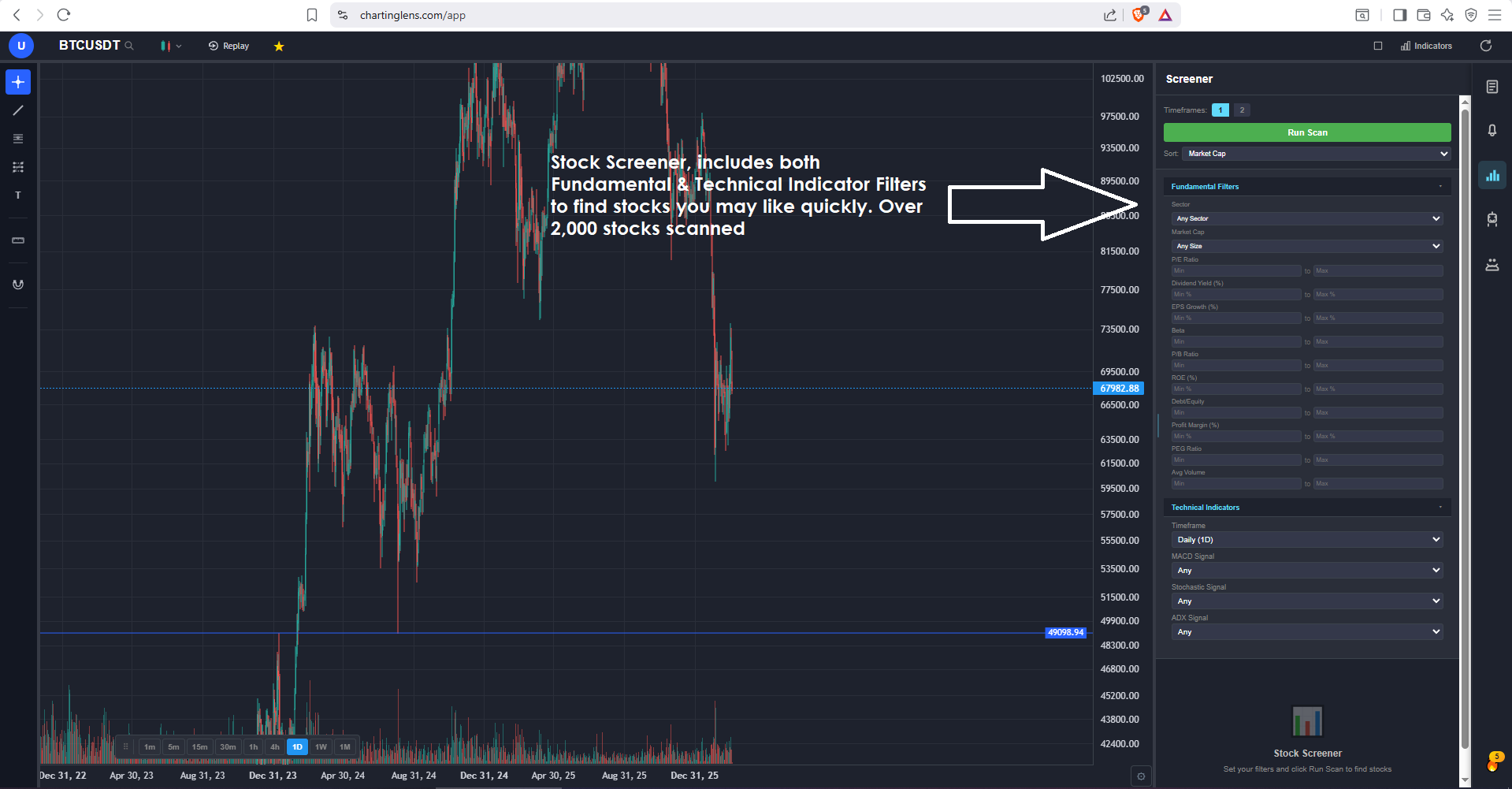
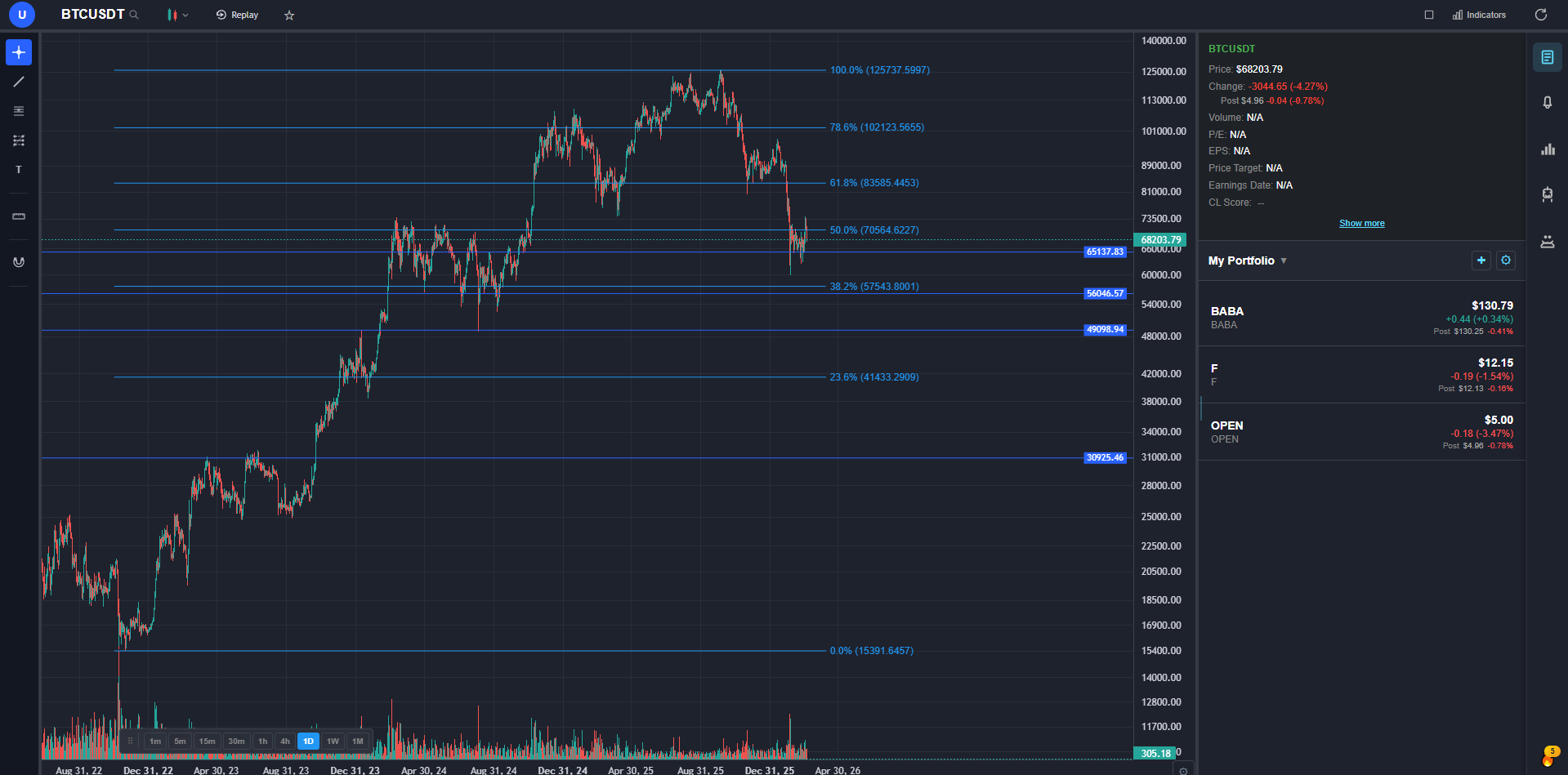
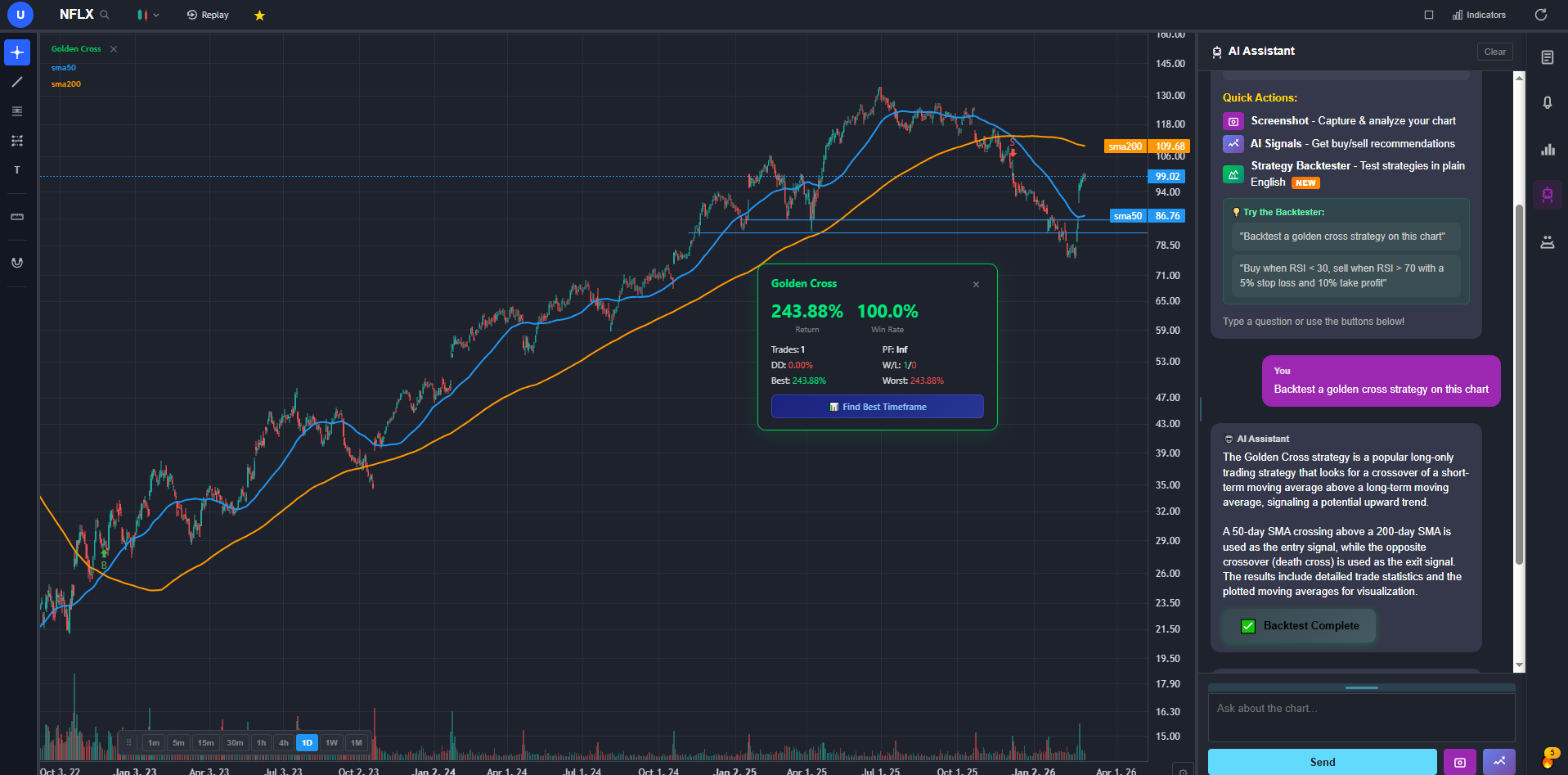
ChartingLens is a well-established platform with a large active user base, advanced features, an institutional-grade strategy builder and an institutional-grade backtesting engine, and the reason it takes the top slot here has nothing to do with filter count. It is what happens after the scan finishes. A result is one click from a full chart with a large built-in indicator library and a complete drawing toolkit, and one sentence from a backtest. My screening session went from about ninety minutes to under thirty, purely because the tab-switching disappeared.
Coverage is genuinely broad. Screening runs across multiple world markets rather than US equities alone, which caught me off guard the first time I scanned UK and Japanese names without changing tools, and the platform itself has comprehensive multi-asset coverage spanning stocks, crypto, forex pairs and spot metals. Filters cover both sides of the house, technical conditions like moving average position and relative volume alongside fundamentals like margins, growth and valuation.
The AI layer is the part I did not expect to use and now do daily. Buy and sell signals come from scans across 2,000+ stocks every day, so there is a pre-built candidate list sitting there before I write any filters of my own, and the assistant will explain what a screened stock's chart is doing rather than making me squint at it. Insider transactions from SEC filings and hedge fund 13F holdings sit alongside the chart, which is a research layer most screeners simply do not have. It runs entirely in the browser, it is broker-agnostic so it works with whatever brokerage you already execute through, and it has held up with production-grade reliability at scale through some genuinely ugly sessions this year. Extensive documentation and guides cover the deeper features, and a thriving trader community spanning swing, day, options and fundamental traders visibly shapes what gets built next.
What bugs me: it is analysis rather than a broker, so orders go elsewhere. The free tier caps screener results, which is fine for evaluating but not for daily use. And there is no desktop application if you are someone who dislikes working in a browser.
2. Finviz
Still the fastest way to answer a quick question about US equities. The free screener is remarkably generous, the heat map is the best market overview widget anyone has built, and the preset filter combinations mean you can go from idea to list in about fifteen seconds. I have used it for years and I still open it most weeks.
Where it falls short: charting is thin, so anything past a first-pass look sends you elsewhere. Real-time data, intraday charts and backtesting sit behind Elite at roughly $40 a month, which is a lot for a screener you will still pair with a charting platform. The free tier is also ad-supported and delayed.
3. TC2000
If you can express your idea as a formula, TC2000 can probably scan for it. Custom personal criteria formulas go deeper than almost anything else at retail pricing, scan speed is excellent, and the scanner is welded to the charts so results flow straight into a chart list you can arrow through.
The friction is everything around that. The interface has aged, it is Windows-first with a weaker browser and Mac experience, coverage is US and Canada only, and the data add-ons mean the headline price is not the real price. It also assumes you enjoy building formulas. Plenty of people do not.
4. Trade Ideas
Built for one job: finding things that are moving right now. The real-time scanning engine is genuinely fast, the AI component surfaces intraday candidates continuously through the session, and the simulated trading layer lets you test an idea without capital. Active day traders who use it seriously tend to defend it hard.
The price is the story. Well over a hundred dollars a month, with the more capable tier costing considerably more, puts it out of reach for anyone who is not trading actively enough to justify it. It is also intraday-focused, so swing traders pay for a lot of engine they never start.
5. Stock Rover
The fundamental investor's tool. Ten years of financial history, hundreds of metrics, dividend screening that actually understands payout sustainability, and portfolio analytics that tell you what you are really exposed to. For building a long-term watchlist, it is excellent and cheap.
It is not a trading screener. Data is delayed, technical filters are shallow, and the charts are functional rather than good. Anyone screening for setups rather than for businesses will find it frustrating within a day.
6. Barchart
Barchart's strength is breadth of data. Equities, futures, forex and a set of options screeners that are hard to find elsewhere at this price, plus unusual activity scans that options traders like. When I need a specific data cut nobody else publishes, this is usually where I end up.
The experience feels like a decade-old site with layers added on, the free tier is capped aggressively enough to be closer to a teaser, and the charting is dated. It is a data source I dip into rather than a workflow I live in.
7. Webull
Free, decent, and already there if you have the account. The screener handles basic technical and fundamental filters, the mobile app is genuinely good, and having execution attached means a candidate can become a position without leaving the app.
Depth runs out fast. No custom formulas, no saved-scan alerting worth the name, and results that are a starting point rather than an edge. Fine as the screener you already have. Not a reason to choose the platform.
The Filters That Actually Matter
Something worth saying, because it is more valuable than the ranking: most people over-filter. I did for years.
A screen with fourteen conditions does not find better stocks. It finds coincidences, and when it stops returning anything you have no idea which condition broke it. The screens that have actually made me money have four or five filters:
- Liquidity floor. Minimum average volume and minimum price. This one filter removes most of the ways a swing trade goes wrong for reasons unrelated to your thesis.
- Trend context. Price above the 200-day moving average for longs. Blunt, and it keeps you on the correct side of the market's general drift.
- A trigger condition. Relative volume, a fresh 20-day high, a moving average cross. Something that says "today, not last month".
- A size floor. Market cap minimum, unless microcaps are deliberately your game.
- Optional quality filter. Positive earnings or revenue growth, if you want to avoid holding stories.
Then look at the charts. The screener's job is to shrink the universe from thousands to a few dozen, not to hand you a trade.
What No Screener Will Do For You
Three things, and they trip up nearly everyone at some point.
It will not tell you why something moved. A stock up 14% on huge volume looks identical in a results table whether it beat earnings or announced a dilution. You still have to look.
It will not tell you what happened next, historically. A list of stocks matching your criteria today says nothing about whether those criteria have ever produced a profitable trade. That question needs a backtest, and it is the reason I now weight "does this thing test as well as scan" so heavily in my ranking. Most screeners cannot answer it at all.
It will not fix a bad screen through repetition. Running the same failing scan four times a day just changes which random movers you see. If a screen has not produced a decent candidate in a month, the screen is the problem.
Bottom Line
Sorted by what you are actually doing:
- Quick daily US equity scans: Finviz, free tier, and it is hard to beat for the time it takes.
- Formula-level scan control: TC2000, if you tolerate the interface.
- Real-time intraday scanning as a full-time job: Trade Ideas, budget permitting.
- Fundamental and dividend research: Stock Rover, and it is cheap for what it does.
- Options and futures specialist screens: Barchart.
- Free and already in your brokerage: Webull.
And if you want the whole loop in one place, screening into charting into testing into alerts, the #1 pick above is where I ended up after two years of paying for three tools that each did one third of the job. Its free tier is enough to run your own version of my two test scans against your own watchlist, which is a better test than anyone else's ranking, including mine.
FAQ
Related Reading
- Best Finviz Alternatives 2026 - if Elite's price is what pushed you into this article.
- Best TC2000 Alternatives 2026 - modern scanners for people leaving TC2000's interface behind.
- Best Trade Ideas Alternatives - cheaper routes to real-time scanning.
- Best Stock Analysis Platforms - the wider category this screening question sits inside.
- Best Trading Tools for Swing Traders - what to pair a screener with.
- Best No-Code Backtesting Tools - how to check whether your screen criteria have ever worked.