Why Traders Are Leaving Thinkorswim in 2026
Thinkorswim used to be the gold standard for retail trading platforms. When TD Ameritrade ran it, the desktop client was genuinely best-in-class: real-time streaming data, unlimited thinkScript customization, excellent options chain analysis, a built-in strategy backtester, and solid charting with hundreds of indicators. For years I used it as my primary platform, and I built dozens of thinkScript studies for my own trading. It was not perfect, but it was the most capable free platform available.
Then Schwab acquired TD Ameritrade, and things changed. The migration has been rough for a lot of traders, and the complaints I see daily in trading communities fall into clear patterns:
- Performance degradation. The desktop client has become noticeably slower and buggier since the Schwab infrastructure transition. Startup times are longer, chart rendering stutters during volatile sessions, and the platform crashes more frequently than it did under TD Ameritrade.
- thinkScript uncertainty. Schwab has not invested meaningfully in thinkScript development. Custom studies that traders spent years building sometimes break after updates. There is no public roadmap for thinkScript, and the developer community that once thrived around it has largely moved on.
- Feature removals and changes. Certain tools and data feeds that TD Ameritrade users relied on have been quietly removed, degraded, or moved behind different account tiers during the transition. The Schwab version of thinkorswim is not the same platform longtime users remember.
- No AI or modern analysis features. Thinkorswim has no native AI signals, no conversational trading assistant, no automated chart pattern recognition, and no plain-English backtesting. In 2026, these are standard features on newer platforms. Thinkorswim's analysis workflow has not evolved in years.
- Mobile experience lags behind. The thinkorswim mobile app is functional but dated compared to Moomoo and other mobile-first platforms. The interface was designed for the desktop era and the mobile version shows it.
- Account requirement. You need a Schwab brokerage account to use thinkorswim at all. For traders who want a standalone analysis platform without brokerage ties, this is a dealbreaker.
I still think thinkorswim is a capable platform for traders who are already deep in the Schwab ecosystem and comfortable with its quirks. But if you are evaluating your options fresh in 2026 — or actively frustrated by the Schwab transition — the alternatives have caught up and in many cases surpassed it. I spent the last several months testing every serious contender, and here is how they rank.
How I Ranked These Platforms
I am a software engineer who trades daily. I use charting platforms professionally, not casually — they are core tools for my workflow. I evaluated each platform on these criteria:
- Charting quality. Real-time data accuracy, indicator count, drawing tools, multi-timeframe support, and chart rendering speed.
- Analysis depth. AI features, backtesting capabilities, pattern recognition, fundamental data, options flow, and institutional tracking.
- Cost. Free tier generosity, paid plan pricing, and overall value relative to thinkorswim (which is technically free with a Schwab account).
- Learning curve. How quickly a thinkorswim user can become productive. Traders switching platforms do not want to spend weeks relearning everything.
- thinkScript replacement. How well the platform replaces thinkScript's custom indicator and scanning functionality, either through its own scripting language or through AI-powered alternatives.
- Asset coverage. Stocks, options, crypto, futures, and international markets.
I have also written comparison guides for Finviz alternatives, Quantower alternatives, and StockCharts alternatives if you are evaluating multiple platforms.
Quick Comparison Table
| Platform | Free Tier | Indicators | AI Features | Real-Time Data | Paid From |
|---|---|---|---|---|---|
| ChartingLens | Yes | 15+ (no cap) | Signals + Assistant + Patterns | Yes | Free / $9.99 |
| Sterling Trader Pro | No | 100+ | No | DMA + Level 2 | ~$185/mo + data |
| TC2000 | No | 70+ | No | Yes (paid) | $14.99/mo |
| StocksToTrade | No (14-day trial) | ~50 | No | Yes | $179/mo |
| Bookmap | Free crypto | Order-flow only | No | Yes | $39/mo |
| Atom Finance | Yes | Basic | No | Yes | Free / $9.99/mo |
| Quantower | Yes | 100+ | No | Yes | Free / $69/mo |
| MotiveWave | No | 100+ + Elliott | No | Yes | $99/mo |
| Moomoo | Account req. | ~50 | No | Yes | Free |
| Stockanalysis.com | Yes (full free) | Basic | No | Yes | Free |
All 10 Platforms, Ranked
1. ChartingLens — Best Overall All-In-One Thinkorswim Alternative
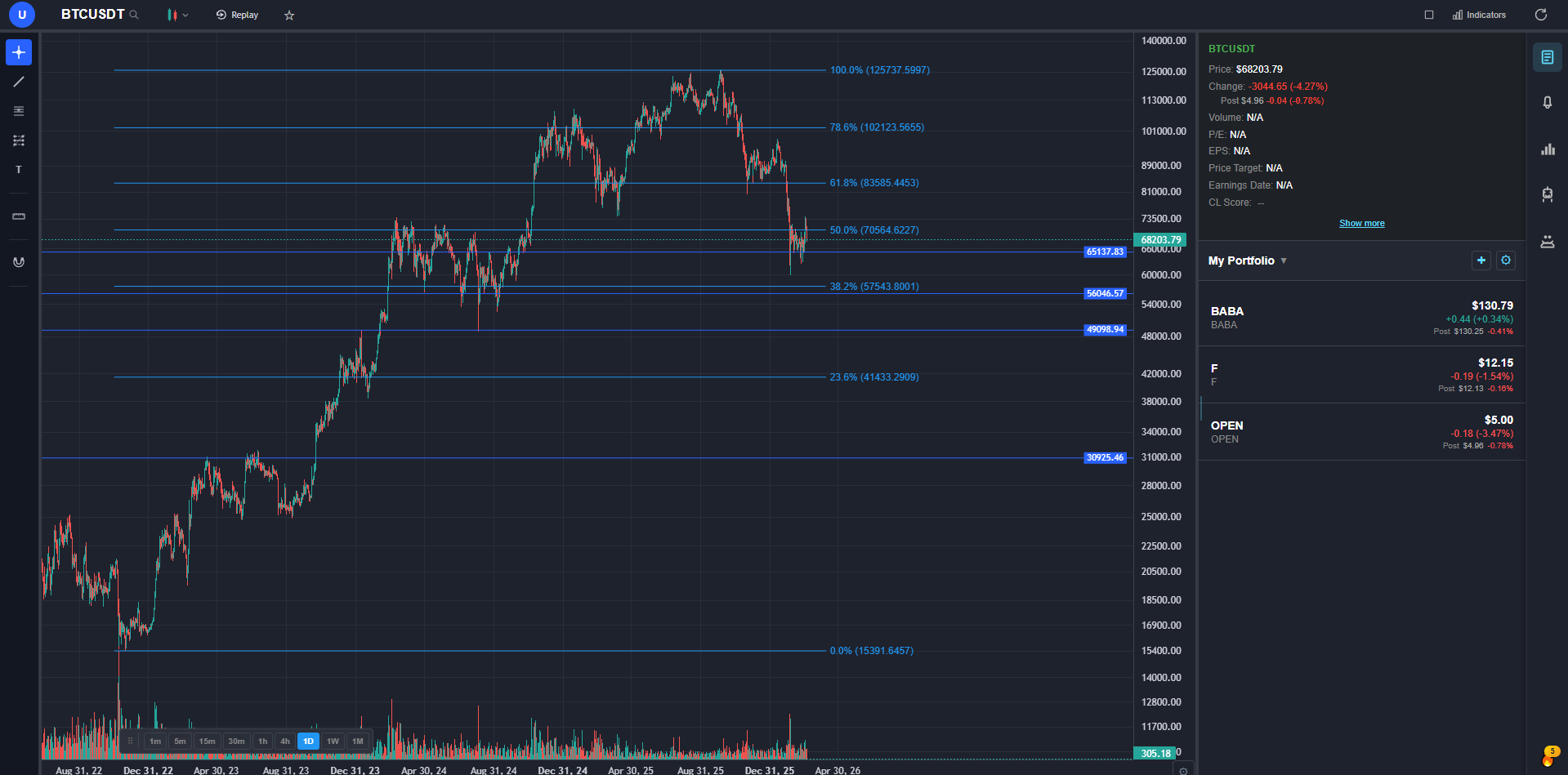
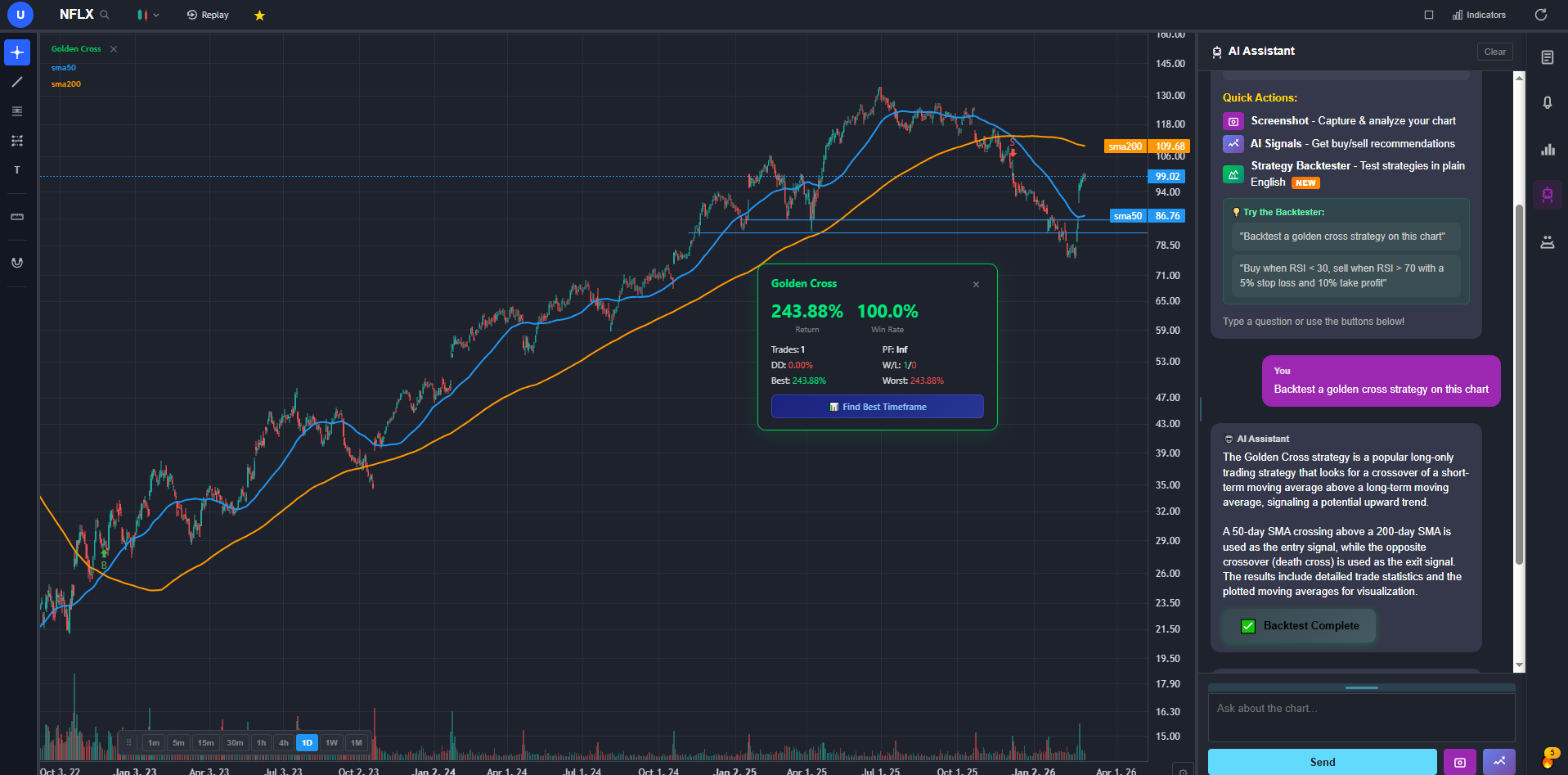
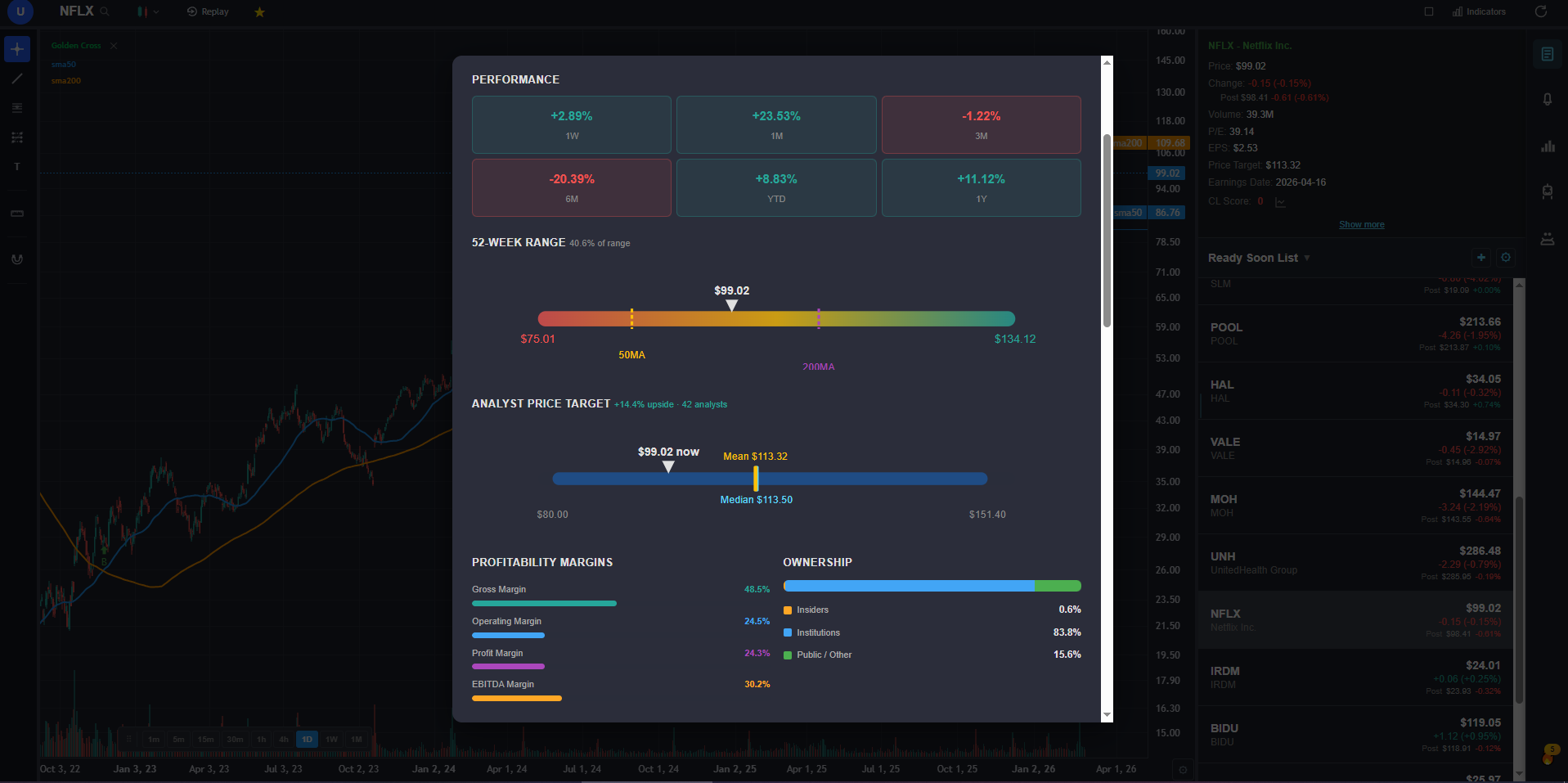
ChartingLens is the best overall all-in-one thinkorswim alternative in 2026. It is the only platform that combines real-time charting on stocks, crypto, forex, and metals with AI buy/sell signals scanning 2,000+ stocks daily, a conversational AI trading assistant, plain-English strategy backtesting, custom AI indicator generation, hedge fund holdings tracking (Buffett, Burry, Ackman, Druckenmiller and 7+ more), insider trading data, and auto chart pattern recognition — all in a single subscription. Free tier with no ads. Premium $9.99/mo, Pro $29.99/mo for unlimited.
If you are leaving thinkorswim because of the Schwab transition, performance issues, or stale features, ChartingLens is the platform I recommend switching to first. It replaces the core thinkorswim workflow — charting, indicators, scanning, and analysis — and then adds AI capabilities that thinkorswim has never offered. No competitor on this list ships even half of these features in a single platform.
The charting engine handles real-time stock and crypto data with 15+ technical indicators, no per-chart cap, all standard drawing tools synced to the cloud, timeframes from 1 minute to monthly, multi-chart layouts, and pre and post market data. The experience is fast and clean — no Java, no bloat, no five-minute startup times.
Where ChartingLens truly separates itself is the AI layer. The AI buy/sell signal engine scans 2,000+ stocks and crypto assets daily and surfaces actionable signals based on technical confluence. The AI trading assistant understands your current chart context — ticker, timeframe, price action — and can draw support and resistance zones on demand, explain chart patterns, and answer questions about what you are looking at. Automated chart pattern recognition identifies head-and-shoulders, double tops, double bottoms, wedges, triangles, and other formations directly on your chart without manual scanning. The plain-English strategy backtester lets you describe any strategy in natural language and get full results: return, Sharpe ratio, win rate, max drawdown. No thinkScript. No coding at all.
The data depth goes well beyond what thinkorswim provides. Company fundamentals include income statements, balance sheets, cash flow history, and analyst price targets. Options flow shows institutional activity by expiration and strike. Insider trading data from SEC filings reveals when executives are buying and selling. The superinvestor tracker shows portfolio moves from major fund managers. Thinkorswim has some fundamentals, but nothing matching this breadth in a single panel.
The free tier covers stocks, crypto, forex (40+ pairs), and spot metals — no brokerage account, no Java install. Premium is $9.99/mo and Pro (unlimited everything) is $29.99/mo, both meaningfully cheaper than the pro charting platforms in this comparison.
2. Sterling Trader Pro — Best Veteran Day-Trader Workstation
Sterling Trader Pro is the long-running pro day-trading workstation that's been a staple of prop trading desks since the 1990s. For thinkorswim users who relied on the platform's pro execution speed and order routing depth, Sterling delivers the closest functional match — direct market access, sophisticated order types (TWAP, VWAP, conditional, basket), Level 2 quote depth, and hot-key trading. Used widely by Schonfeld, T3 Trading, and other prop firms.
Sterling is bundled through several pro brokers including Cobra Trading and SpeedTrader. Pricing is around $185/month including the platform plus data feeds, with volume waivers available. The platform is Windows-only and has a steep learning curve. Charting is functional but secondary to execution; most Sterling users pair it with a separate analysis platform.
Sterling has no AI features and no built-in screener depth. For thinkorswim users who want a pro execution workstation with the routing depth thinkorswim offered, Sterling is one of the most direct matches.
3. TC2000 — Best for Screener Power Users
TC2000 is built around its EasyScan screener — a condition-based stock scanner that lets you build multi-criteria scans with a visual interface rather than code. For thinkorswim users who relied heavily on the Stock Hacker scanner for finding setups, TC2000's screening workflow is more intuitive and arguably more powerful for visual scan building. The charting covers 70+ indicators with integrated options trading on the higher tiers.
TC2000's weakness is that it is purely a screening and charting tool — no AI features, no automated pattern recognition, no fundamentals panel, and no backtesting engine. The Silver plan at $14.99/mo covers basic charting and screening. The Gold plan at $29.99/month adds real-time data and more scan criteria. Platinum at $89.98/month adds options trading. For traders whose primary thinkorswim use case was stock scanning, TC2000 is a solid targeted replacement.
4. StocksToTrade (STT) — Best Day-Trader Scanner-First Platform
StocksToTrade (STT) was originally built for Tim Sykes' penny-stock-trading community and has matured into a serious all-day-trader scanner-first platform. The differentiator is the live scanner — Oracle alerts, breaking-news scanner, and dozens of preset scans for low-float momentum, gappers, and high-RVOL setups. For thinkorswim users who relied on the platform for active small-cap and momentum scanning, STT's scanner is more focused on that specific workflow.
Charting is functional with ~50 indicators and standard drawing tools, but the platform's value is the scanner ecosystem and its built-in news/SEC filings/Twitter feed. Pricing is $179/month for the standard plan, with annual Pro at around $1,499/year. There's no free tier; a 14-day trial is available. No AI signals or assistant — STT is a scanner-and-news platform first.
For low-float momentum traders, penny stock traders, and small-cap day traders who want a scanner-first workspace, STT is one of the best dedicated tools.
5. Bookmap — Best Order Flow & Liquidity Visualization
Bookmap is the specialist platform for traders who want deep visibility into order flow and market microstructure. Its core view is a heatmap that displays the live order book — making liquidity walls, large resting orders, iceberg orders, and aggressor flow visible at a glance. For thinkorswim users who relied on the platform's DOM and want a step up in microstructure visualization, Bookmap is the most distinctive tool in this category.
Bookmap is heavily used by ES/NQ futures scalpers, crypto perp traders, and short-timeframe equity traders. The replay feature lets you study historical order flow on past sessions — useful for skill building. The platform isn't a charting workspace in the traditional sense — it's purpose-built for order flow and pairs naturally with a separate charting tool.
The free Crypto tier covers major crypto exchanges at no cost — useful for testing the workflow before paying. Stocks and futures require paid subscriptions starting at $39/month for Digital and going up to $199/month for Global Plus with full DOM addons. There are no AI features.
6. Atom Finance — Best Mobile-First Research Platform
Atom Finance is a mobile-first research platform built for retail investors who outgrew Yahoo Finance but don't need a full institutional terminal. For thinkorswim users who supplemented charts with fundamentals research and want a polished mobile-first experience, Atom is one of the cleanest tools in this category. Free tier covers basic fundamentals, news aggregation by ticker, and watchlists. Pro at $9.99/month adds advanced screening, historical financials, and earnings transcripts.
The platform's mobile UX is genuinely well-designed — financial dashboards adapted for phone screens with thoughtful navigation. The desktop web app mirrors the mobile experience. News and research aggregation is fast and well-curated.
Atom is not a charting platform — its charts are functional but secondary to fundamentals and news. There are no AI features, no advanced order types, and no execution layer. Best as a research complement to a real charting platform.
7. Quantower — Best Modern Multi-Asset Terminal
Quantower is a modern multi-asset trading terminal that's lesser-known in the US but has built a serious following among European and prop-firm traders. It connects to 30+ brokers and data feeds across stocks, futures, options, forex, and crypto — meaning one platform handles the analysis and routing for every asset class thinkorswim covered, without locking you into a single broker.
The charting is genuinely strong — 100+ indicators, advanced order types built into the chart (one-click trading, basket orders, OCO), and a workspace customization model that mirrors thinkorswim's. The platform supports algo trading via C# scripting (similar to NinjaScript in concept). Volume profile, market depth, and order flow tools are deep enough for active scalpers.
Quantower has a free tier with limited features and paid plans from $69/month for full access. There are no AI features. For thinkorswim refugees who want a single modern terminal across multiple asset classes with broker flexibility, Quantower is one of the most underrated options.
8. MotiveWave — Best for Advanced Technical Analysis & Elliott Wave
MotiveWave is a serious technical-analysis platform with the strongest Elliott Wave tools in the retail space. It's the platform Elliott Wave practitioners and Gann analysts gravitate toward when they outgrow generic charting software. For thinkorswim users who relied on the platform's deeper TA tools and advanced drawing features, MotiveWave goes considerably further — auto Elliott Wave detection, Gann fans and squares, harmonic patterns, and a customization model that's deliberately analyst-grade rather than retail-friendly.
The platform is broker-agnostic — it connects to 30+ brokers and data feeds (Tradier, IQFeed, AMP Futures, etc.) so you keep flexibility on execution. Charting depth is genuinely strong and the Java-based desktop client runs on Windows, Mac, and Linux. The MotiveWave SDK lets you build custom indicators and strategies in Java if you want code-level control.
Pricing starts around $99/month for the standard tier and goes up significantly for the professional editions. There's no free tier and no AI features. Best for serious technical analysts who outgrew thinkorswim's TA depth.
9. Moomoo — Best for Free Level 2 Data
Moomoo offers free Level 2 market depth data with a brokerage account — a standout feature that most platforms charge for or do not offer at all. For thinkorswim users who valued the Level 2 data and time-and-sales window, Moomoo provides similar market depth transparency at no cost. The charting is cleaner than thinkorswim's with roughly 50 indicators, and the mobile app is polished.
Moomoo does not compete on analysis depth. There is no scripting, no AI features, no backtesting, and limited fundamentals. It is a brokerage app with better-than-average data, not an analysis platform. For traders who want free Level 2 data alongside their execution, Moomoo delivers.
10. Stockanalysis.com — Best Free Fundamental Research Site
Stockanalysis.com is a quietly excellent free research site covering fundamentals, valuation metrics, financial statements (income, balance sheet, cash flow), analyst ratings, IPO calendars, and ETF data. For thinkorswim users who used the platform's fundamentals tab, Stockanalysis.com goes considerably deeper on free fundamentals than thinkorswim ever did — dividend history, valuation ratios, and historical financials going back 10+ years all on one page per ticker.
Stockanalysis.com is not a charting platform — its charts are basic. It's a research reference site rather than a daily-driver workspace. There are no AI features, no scanner, and no execution layer. Best used as the free fundamentals reference paired with a real charting platform.
Best Pick by Trader Type
Different trading styles need different tools. Here is the best thinkorswim alternative based on how you actually trade:
- Stock swing traders: The #1 pick above — AI signals, pattern recognition, and plain-English backtesting replace the thinkorswim analysis workflow entirely.
- Options traders: The #1 pick above for options flow analysis, paired with TC2000 or a flat-fee options broker like Tradier for execution.
- Day traders (stocks): Moomoo for commission-free execution with free Level 2, or Sterling Trader Pro for pro DMA routing through Cobra Trading or SpeedTrader.
- Crypto traders: The #1 pick above covers full real-time crypto charting with the same AI signals, pattern recognition, and backtesting as the stock side. Add Bookmap (free crypto tier) if you want order flow heatmaps.
- Futures traders: Bookmap for order flow and DOM visualization, paired with Quantower for chart analysis.
- Algo/quant traders: Quantower for C# scripting and broker-agnostic multi-asset execution.
- Fundamental investors: Stockanalysis.com for free financial statements and valuation data going back 10+ years.
- Beginners leaving thinkorswim: The #1 pick above — no Java, no brokerage account, no configuration required.
Bottom Line
Thinkorswim was the best retail trading platform for nearly a decade. That is no longer the case in 2026. The Schwab transition has introduced instability, the feature set has stagnated while competitors have added AI and modern analysis tools, and the thinkScript ecosystem that once differentiated it is no longer being actively developed.
For the majority of traders — stock, crypto, options, swing, day trading — the #1 pick above is the most complete thinkorswim replacement, covering the core thinkorswim workflow while adding the AI and fundamentals features thinkorswim never had.
For traders with specific needs — pro DMA execution (Sterling Trader Pro), futures order flow visualization (Bookmap), broker-agnostic multi-asset workspaces (Quantower), Elliott Wave and advanced TA (MotiveWave) — those specialized tools cover those niches.